Resetting the headset
If the headset cannot be turned on or cannot be operated even when it is turned on, reset the headset.
Press and hold the button on the left unit for about 20 seconds.
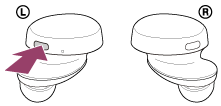
Release your finger when the indicator (red) of the headset turns off after flashing.
Then press and hold the button on the right unit for about 20 seconds.
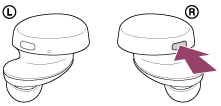
Release your finger when the indicator (red) of the headset turns off after flashing.
The device registration (pairing) information and other settings are retained.
If the headset does not operate correctly even after resetting, initialize the headset to restore factory settings.
https://helpguide.sony.net/