Translate

Location and function of parts Charging case
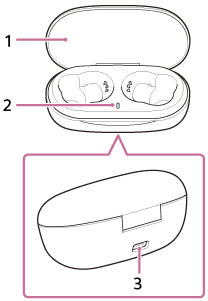
Location and function of parts Charging case

  1. Lid
  2. Indicator (red)
    Shows the charging state.
  3. USB Type-C port
    Connect the charging case to an AC outlet via a commercially available USB AC adaptor or to a computer with the supplied USB Type-C cable to simultaneously charge both the headset and the charging case.

https://helpguide.sony.net/

Note :

"Location and function of parts Charging case"

This content is uploaded by APPLICATION STEPS DEVELOPER and available on Google Play Store. APPLICATION STEPS DEVELOPER do not own this content and this content credits to their respective owners listed in the source link. Hopefully useful and share this app.

Design and Coded by www.idblanter.com www.blantertheme.com www.blantermedia.com (Rio Ilham Hadi) 08888905441