Listening to music from a device via Bluetooth connection
If your Bluetooth device supports the following profiles, you can enjoy listening to music and control the device from your headset via Bluetooth connection.
- A2DP (Advanced Audio Distribution Profile)
You can enjoy high-quality music wirelessly. - AVRCP (Audio Video Remote Control Profile)
You can adjust the volume, etc.
The operation may vary depending on the Bluetooth device. Refer to the operating instructions supplied with the Bluetooth device.
-
Insert the headset units into both ears.
Put the unit with the
 (left) mark on your left ear and the unit with the
  (right) mark on your right ear. The left unit has a tactile dot.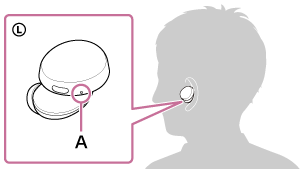
A: Tactile dot
Twist the headset to slide the earbud deep into your ear.
-
Connect the headset to a Bluetooth device.
-
Operate the Bluetooth device to start playback and adjust the volume to a moderate level.
-
Press the button on the left unit to adjust the volume.
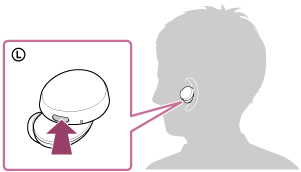
- Increase the volume: Press the button on the left unit once during music playback to increase the volume by 1 step.
- Decrease the volume: Press and hold the button on the left unit during music playback to decrease the volume continuously. Release the button at the desired volume level.
When the volume reaches the maximum or minimum, an alarm sounds.
Hint
- The headset supports SCMS-T content protection. You can enjoy music and other audio on the headset from a device such as a portable TV that supports SCMS-T content protection.
- Depending on the Bluetooth device, it may be necessary to adjust the volume or set the audio output setting on the device.
- The headset volume during a call and during music playback can be independently adjusted. Changing the call volume does not change the volume of music playback and vice versa.
Note
- If the communication condition is poor, the Bluetooth device may react incorrectly to the operation on the headset.
https://helpguide.sony.net/