Connecting to a paired Bluetooth device
-
Remove the headset from the charging case.
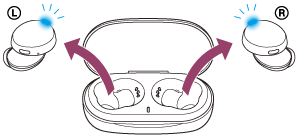
The headset turns on automatically. Check that the indicators (blue) flash.
-
Insert the headset units into both ears.
If the headset has automatically connected to the last connected device, you will hear the voice guidance say, “Bluetooth connected”, from the left unit of the headset.
Check the connection status on the Bluetooth device. If it is not connected, proceed to step 3.
-
Make the Bluetooth connection from the Bluetooth device.
As for the operations on your Bluetooth device, refer to the operating instructions supplied with the Bluetooth device.
When connected, you will hear the voice guidance say, “Bluetooth connected”, from the left unit of the headset.
Hint
- The operation above is an example. For more details, refer to the operating instructions supplied with the Bluetooth device.
Note
- If the last-connected Bluetooth device is placed near the headset, the headset may connect automatically to the device by simply turning on the headset. In that case, deactivate the Bluetooth function on the last-connected device or turn off the power.
- If you cannot connect your Bluetooth device to the headset, delete the headset pairing information on your Bluetooth device and perform the pairing again. As for the operations on your Bluetooth device, refer to the operating instructions supplied with the Bluetooth device.
https://helpguide.sony.net/